
Butcher Me Not Android: How to Download and Play This Horror Visual Novel
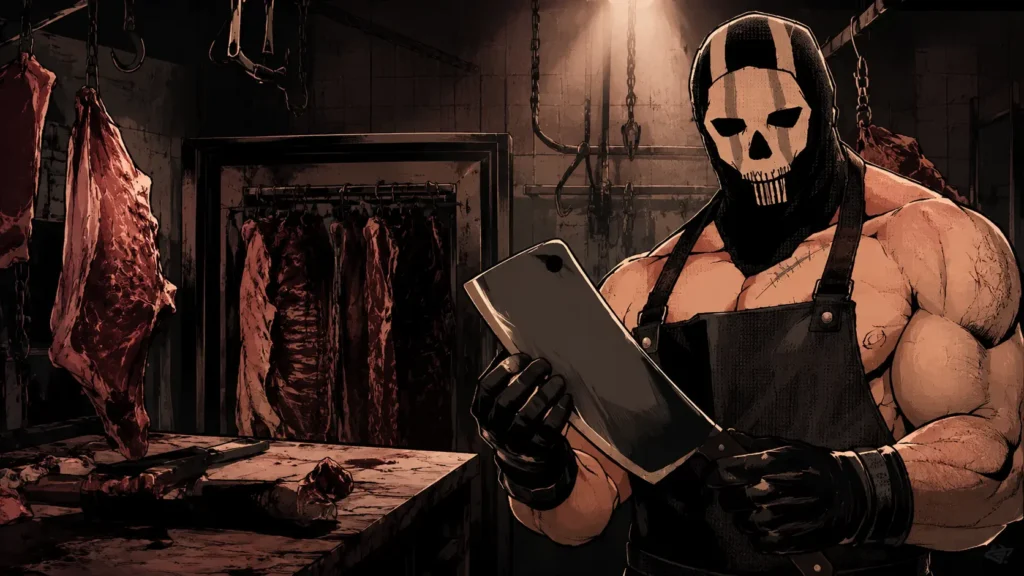
A new horror visual novel has been spreading fast across itch.io, and it goes by a strange, memorable name: Butcher Me Not. If you keep seeing clips of it online and want to try it yourself on your phone, you are in luck. Unlike a lot of small horror games, this one already has an official Android build, so you do not need any extra apps or workarounds to play it.
In this guide, we will cover what Butcher Me Not is about, why people are talking about it, and the exact steps to get it running on your Android device the simple way.
What Is Butcher Me Not?
Butcher Me Not is a horror visual novel made by a solo developer known as Arrokoth. It is built as a fan game connected to the Call of Duty universe, which is part of why it caught attention so quickly, since it takes familiar character designs and drops them into a completely different, unsettling story. This game is a Call of Duty fan game!
The setup is simple but tense: you wake up somewhere cramped and swaying, your body restrained, unable to move freely. Beside you is a man in a skull-shaped mask and a stained apron, holding a large knife. From there, the story unfolds through dialogue choices, tense moments, and a slow build of dread as you try to figure out what this masked figure actually wants from you.
A few things about the game worth knowing before you download it:
- It is a work in progress. New episodes are being added through regular updates rather than releasing as one complete story at launch.
- It carries a content warning. The game deals with themes of cannibalism and captivity, so it leans into dark, mature horror rather than lighthearted scares.
- Controls are simple. On Android, you advance dialogue with a tap and go back using a two-finger tap, so there is no complicated control scheme to learn.
- Multiple languages are supported, including English, Korean, Simplified and Traditional Chinese, and Spanish, with more planned.
- The rating is strong. With thousands of comments and a high average score from players, it has clearly connected with its audience despite still being early in development.
If you enjoy horror visual novels that focus on atmosphere and dialogue-driven tension rather than jump scares, this is the kind of game built exactly for that audience.
Why Butcher Me Not Is Getting So Much Attention
A few things are driving the buzz around this game, and they are worth understanding if you are wondering whether it is worth your time.
- The Call of Duty connection pulls in a built-in audience. Fan games that reimagine familiar characters in new settings tend to spread quickly, especially when the character designs are recognizable to fans of the source material.
- The horror-romance mix is a popular niche. Instead of pure horror, Butcher Me Not blends fear with tension between the player and the masked character, which is a combination that has performed well across other visual novels in this genre.
- It updates in short episodes. Rather than making players wait a long time for a full release, the developer is releasing the story in smaller chunks, which keeps the community checking back and talking about what might come next.
- It is easy to record and share. Because it is dialogue-heavy and choice-driven, it works well for short gameplay clips, reaction videos, and story recaps, which helps it spread across social platforms.
- No generative AI was used in its creation, something the developer has stated directly on the game’s page. For an audience that increasingly cares about how content is made, this detail has also played a role in how the game has been received.
The Story and Gameplay Style Explained
Butcher Me Not leans heavily on atmosphere rather than action. There is no combat, no inventory to manage, and no puzzles to solve in the traditional sense. Instead, the game asks you to sit with tension. Every scene is built around small choices in how you respond to the masked character, and those choices shape how the story branches from there.
The visual style mixes hand-drawn character art with a muted, moody color palette that fits the mood of the story. Character expressions shift subtly depending on the scene, which helps sell the emotional weight of certain moments without needing heavy animation. The pacing is deliberately slow in places, letting silence and stillness do a lot of the storytelling work instead of constant dialogue.
Because the story is being released in episodes, the current build covers only the opening chapter of a larger planned narrative. Players who finish it should expect a cliffhanger rather than a full resolution, with future updates set to expand the cast, introduce more characters, and continue the story from where the first episode leaves off.
Can You Play Butcher Me Not on Android?
Yes, and this is the part that makes things easy. Unlike many RPG Maker style games that only release for Windows and require an extra app like JoiPlay to run on a phone, Butcher Me Not already has an official Android build listed directly on its itch.io page. You do not need to install any interpreter apps or plugins here. The developer packaged an APK file specifically for Android users, so the setup process is much shorter than what you would need for a desktop-only release.
Step-by-Step: How to Download and Install Butcher Me Not on Android
Here is the full process from start to finish.
Step 1: Go to the Official itch.io Page
Head to the official Butcher Me Not page on itch.io. Always download from the official page directly rather than third-party file sharing sites, since those often carry outdated or unsafe files.
Step 2: Choose the Android Download
On the download section of the page, you will see a few different files listed, including versions for Windows and macOS. Look for the file labeled specifically for Android and select that one. This is the APK file built to run natively on your phone.
Step 3: Allow Installs From Unknown Sources
Since this file is not coming from the Google Play Store, your phone will likely block the install by default. Go into your Android settings, find the option for installing apps from unknown sources, and turn it on for your browser or file manager app.
Step 4: Download the APK File
Tap the download link on the itch.io page. The file is a reasonable size, so it should not take long on most connections. Once it finishes downloading, you will find it in your phone’s downloads folder.
Step 5: Install the App
Open the downloaded file from your notifications or your file manager. Your phone will show a confirmation screen asking if you want to install the app. Tap install and wait for the process to finish.
Step 6: Open and Play
Once installed, you will find Butcher Me Not sitting on your home screen or app drawer just like any other app. Open it, and you are ready to start the story. Remember that dialogue advances with a tap, and going back uses a two-finger tap, so keep that in mind during your first few minutes with the game.
Troubleshooting Common Problems
Even with an official Android build, a few small issues can pop up. Here is how to handle the most common ones.
- Installation blocked: If your phone refuses to install the file, double check that “Install Unknown Apps” is switched on for whichever app you used to open the file, such as your browser or file manager.
- Game will not launch: Some players have reported the app failing to start right after installing. If this happens, try restarting your phone and opening the app again, since a fresh restart often resolves loading issues tied to permissions.
- Text or images not loading properly: Since the game is still being updated regularly, occasional bugs are expected. If something looks broken, check the game’s devlog on itch.io, since the developer often posts fixes and updates there.
- Language not changing: If you want to switch the game’s language, look for the settings option within the game itself rather than your phone’s system language, since language selection is handled inside the app.
- Storage space errors: Make sure you have enough free space on your device before downloading, since a failed or partial download is one of the most common causes of installation errors.
Is Butcher Me Not Safe to Download?
Yes, as long as you stick to the official itch.io page. The developer has been transparent about the game’s development, actively responds to player comments, and continues pushing updates and fixes. The biggest safety risk with any small indie game is downloading from unofficial mirrors or file-sharing sites that repackage the APK with extra, unwanted software. Sticking to the source avoids that risk completely.
Tips for a Smoother First Playthrough
A few small habits can make your first run through the game more enjoyable and save you from running into avoidable problems.
- Keep your phone’s storage tidy before downloading. Since the developer is actively pushing updates, future versions of the file may be larger than the current one, so leaving some extra storage room now saves you a headache later.
- Check the devlog before starting. The developer posts updates directly on the game’s itch.io page, so a quick look before you play can tell you if a new episode, bug fix, or translation has just been added.
- Turn on notifications if you plan to follow the story. Since updates are released episode by episode, following the developer’s page is the easiest way to know when the next chapter goes live instead of checking back manually.
- Play with sound on. The music, credited to Kevin MacLeod and Presence of Music, plays a big role in building the game’s atmosphere, so muting it removes a lot of what makes the tension land.
- Take your time with dialogue choices. Since the story branches based on your responses, rushing through taps can cause you to miss smaller character moments that add depth to the experience.
Similar Games to Try Next
If Butcher Me Not pulled you in, there are a few other horror visual novels worth checking out on Android:
- Elevator Hitch: a surreal horror visual novel set in a liminal 70s office elevator, playable on Android through JoiPlay, and covered in detail in our full setup guide
- TheButcher: a short PS1-style horror walking sim with a similar dark tone, though built around a different kind of story
- Dead Plate: another horror visual novel popular among Android players using JoiPlay, with a tone that fans of dialogue-heavy horror tend to enjoy.
Final Thoughts
Butcher Me Not stands out because it skips the usual extra setup steps that most small horror games require on Android. With an official APK already available, getting it running on your phone takes just a few minutes. Between its tense premise, its growing episode list, and its strong reception from players so far, it is easy to see why this one keeps showing up in horror game recommendations. Head to the official itch.io page, grab the Android file, and see what is waiting behind that mask for yourself.